Pages

Wednesday, July 24, 2013

Social Media in the Classroom

I think social media in the classroom is a great way to keep kids connected in ways they are (most likely) already using. Facebook and Twitter can be useful tools when used in meaningful ways. Facebook allows teachers and students to stay connected in groups to share information, assignments, and resources. Its forum-like abilities means that students can engage in meaningful conversation and respond to each other. Twitter can help students get and share small bites of information and follow hashtags that help network them with others discussing the same topic all over the world, including following current news and world events in real time, as they unfold. 

Most students are already using Facebook and Twitter to stay up-to-date on everything else going on in their lives; having access to their classmates and teacher in an environment they're already comfortable using to continue the classroom conversation, get assignment reminders and ask questions 24/7 of other classroom members helps kids feel connected and means they are more likely to be involved and engaged in their learning. Those online conversations and interactions helps students to continue thinking about class topics even when they're not in class, and encourages them to participate anytime, anywhere. 

While there are a lot of pros to the idea of using social media in education, (with students 13 or older, the minimum age to create accounts on these networks) some groundwork needs to be laid in advance and expectations covered to address the "cons." Students need to be reminded that even when at home, they still must be respectful in these online spaces with their peers, as it is an extension of the classroom environment. (This can go hand-in-hand with digital citizenship lessons!) Teachers should create a separate, professional account to use in these situations as well, instead of friending students on their personal accounts. While some may think that students will use these networks inappropriately, or that allowing them to use Facebook and Twitter in class means they will spend class time using these networks for personal reasons, it's all about setting those expectations of access and use with students ahead of time, and outlining when and what is appropriate. When you integrate the use of these social networks in meaningful ways as part of their learning, you'll find that students WANT to engage in the assignments, because they're excited to be able to use the social networks they're already comfortable using in an educational way. Most students are already learning and exploring about world events and news from others through their social networks, so it'll be a natural extension that can encourage this desire to always keep exploring and learning. 

When used appropriately, social networks in the classroom can provide rich and meaningful experiences that students are comfortable with and can relate to, encouraging classroom participation and conversation even when they're not in the classroom.

Friday, July 19, 2013

Future Curation Tool to Explore: My Big Campus

Though I enjoy using Pinterest to curate resources, tools, professional development, and edtech articles, I have been fascinated by and interested in checking out My Big Campus for awhile now. I attended a workshop on it last fall, and am even more convinced after looking into further how bundles would be a great way for teachers to curate digital curriculum and create "digital textbooks" from a wide variety of online sources. Even better is that they can share those bundles with each other, helping to spread good sources and curriculum bundles not only across the district, but also with other teachers in the world who may be interested in what they have curated. I like that there are bundles already created, which are good starting points for a new teacher to My Big Campus. They can use those bundles as-is, or remix them and add/remove other resources to create their own bundles unique to their classroom needs. Bundles can easily be presented to students as resources to help facilitate their learning. I know that several teachers are using Edmodo at the high school, and I'm not sure what it would take to do a district-wide My Big Campus setup, but I love the idea of curating and bundling resources to share in a variety of ways.

Wednesday, July 10, 2013

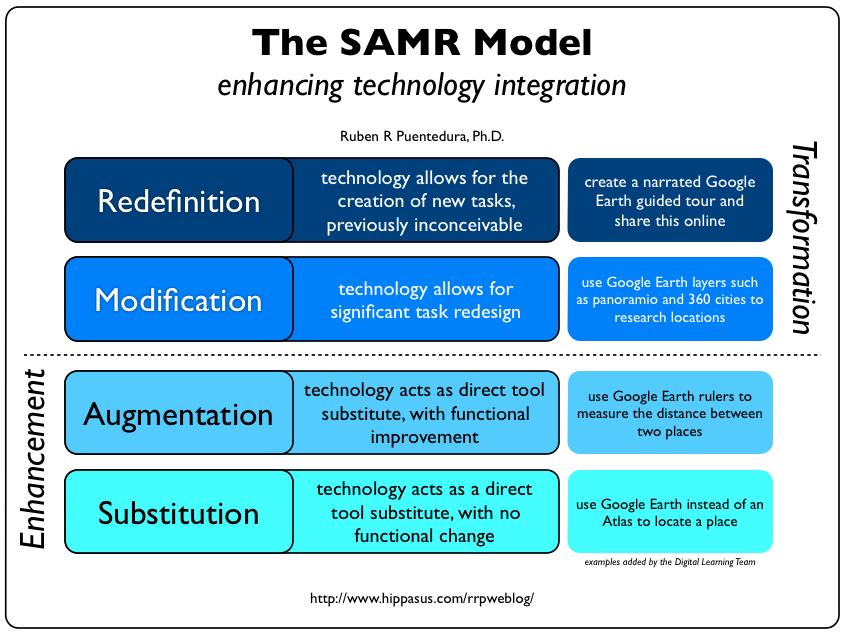
The SAMR Model to Enhance Technology Integration

My summer of eLearning is moving right along, and this week we've been talking about authentic assessment and feedback. We know how important quality feedback is for students in order to push them to their furthest potential in the classroom, but this is true in an online environment, too. Walking hand-in-hand with this is authentic assessment. Online assessment must include more demonstrations of higher-level thinking to be truly authentic and meaningful. Online educators don't have the luxury of being in-person with students when they complete assessments, so multiple-choice assessments you may still see in the physical classroom won't work; are you assessing them on what they've learned, or if they've learned how to Google their answers? (Side note: authentic assessment and higher-level thinking should also be the goal in the physical classroom, too!)

I think this brings me to the topics that have hit the closest to home for me this summer. I really think the introduction of the SAMR model is going to be most beneficial for me to start with. We have a lot of teachers who are trying technology in the classroom, and/or who are eager to get started this next year now that we've introduced BYOD, but I think too many are under the impression that this simply means using technology for technology's sake or substituting paper worksheets for worksheets that can be filled out on a handheld device. We need to move away from the substitution level and progress up the SAMR model ladder to the redefinition level, and I think the SAMR model has given me the framework I can work from to help teachers not only see this progressive ladder, but also start to climb it.

Have you seen this pedagogy wheel by Allan Carrington? It's been updated recently to include the SAMR model around the outer band of the wheel, which is so awesome and helpful! Read more about the update that helps you integrate technology at Edudemic here.


I think as teachers begin to climb the SAMR model ladder towards more transformational integration of technology, they'll find it's a natural progression into more authentic forms of assessment AND make technology integration in their classroom more engaging for students. Right now, I think teachers feel like just having devices in the classroom and using them to do substitution level tasks is motivation enough and is engaging for students. And at the start, sure! Kids will be excited just because they're allowed to use their devices. But it's not enough. The use of technology in this way just isn't meaningful, and "using technology" in classrooms like that will get stale quickly, which will lead to frustration for both teachers and students. It's going to be hard to convince teachers to let go and let students have freedom of choice... but if they use the SAMR model as a framework to build on, they'll get there. Authentic assessment and true student engagement will naturally follow suit.

I feel like I may be rambling a bit, but I think what I've just realized is that the SAMR model is going to be the backbone of how I approach working with teachers this school year. It will help teachers who have been reluctant to take their first steps have a solid starting point, and those who are ready to transition further up the ladder will see how to take their integration to the next level. The hard parts, that is, effective (and ongoing!) student engagement and authentic assessment, will naturally fall in place as the teacher works their way up to using technology in a meaningful, redefined and transformational way, because at the redefinition level students have choice, which is motivating and engaging, and their choices will make way for teachers to authentically assess them.

I'm looking forward to putting some of the things I've learned this summer into practice with staff in the fall. I can't wait to help teachers learn how to use technology in a meaningful way that will help produce students who are equipped with the skills they'll need to tackle the 21st century workplace.

Friday, June 21, 2013

The Technology Integration Matrix and Me

This week in our online and blended learning course we took a look at the Technology Integration Matrix. As I don't deliver content in the areas of LA, Math, Science, or Social Students to a classroom of students any longer, it's hard to pick a spot where I belong, because my job these days is working with teachers and helping them integrate technology into their own classrooms. So if I approach the matrix as a whole and look at each square's description and think about HOW I work with teachers and deliver professional development instead of focusing on a traditional teacher's subject areas, I find myself somewhere around the Adaptation column, wishing I was more into the Infusion section, but feeling like I'm working that direction. When I teach, I focus a lot on collaboration and the tools I like to use and share with teachers involves the ability to collaborate in a variety of ways or for a variety of purposes. When I read the intersection of Adaptation and Collaborative, for example, it says:

Students independently use technology tools in conventional ways for collaboration. Students are developing a conceptual understanding of the use of technology tools for working with others.
The teacher provides opportunities for students to use technology to work with others. The teacher selects and provides technology tools for students to use in collaborative ways, and encourages students to begin exploring the use of these tools.
Desks and workstations are arranged so that multiple students can access technology tools simultaneously.

In my training environment I'm often introducing a new tool or demonstrating how a tool works in context of what the group teaches, to give them some practical examples that they can actually go back and use right away. I'd like to think that the development of my professional development has evolved to this point, where there are bite-sized chunks of modeling, and then opportunities for my "students" to work with others. Because the training is on something specific, I'm often providing the tool and then encouraging them to explore them and apply them in their area.

I feel like when I started my position three years ago, I was definitely further left. More Entry. When I was a classroom teacher several years back the idea of 1:1 or BYOD was newish and not very mainstream or widespread, and we all used the computer lab as much as possible usually for research and typing papers for homework assignments. So yes, we were using computers, but that didn't mean it was more than just a substitutional use, when referring to the SAMR model. This makes me feel good, though, when I look at the Technology Integration Matrix, because I feel like I can see that I've come a long way. So has technology in the classroom, though! And seeing the Infusion and Transformation columns help me see where I want to be and where I need to go. I feel like I have a good grasp of these columns on paper and in my head, and I'd love to think that if I were back in a traditional classroom these days that I could say with certainty that I'd be Transformational all the time, but let's be honest... I also know that in my head and the reality of day-to-day are not always the same. But I'd sure be trying, and that's better than nothing.

Right now my focus is helping move other teachers who are more Entry or Substitution to move forward and progress with technology in a meaningful way. Heck, for some I'm still working on getting their feet wet. It's a daunting task some days, and I know that if it is for me, it definitely is for them, but as long as we're shifting our thinking towards embracing technology and shifting into the facilitator role and letting students drive the bus, we'll all get there eventually.

Wednesday, June 12, 2013

A Summer of eLearning

eLearning Quizlet cards
My eLearning Quizlet Cards
This summer I'm excited to be taking a course on online and blended instruction. In my profession as an Instructional Technology Specialist, I work closely with teachers to help integrate the meaningful use of technology to support best practices, standards, and to promote the engagement of students. This summer I'm offering around 20 different sessions of professional development at our administration building to staff members who voluntarily want to come in and learn things like Google Docs, Excel, or our online CMS, Moodle. We're also hosting a BYOD training for the first time this summer, as we are trying to communicate our newly rolled-out BYOD access across the district.

As I continue to train this summer AND take this online course about blended and online instruction, I really wish that I was able to offer some of my professional development sessions online, too. I haven't decided whether the technology PD I provide would be better suited to a weekly module arrangement or perhaps just a live, accessible way for teachers to tune in to my classes from home. The idea that I could reach so many more staff members than the physical classroom capacity allows in the summertime (or anytime, really!) gets me so excited, and at the same time disappointed that I am not prepared for that this year. Yet. I am really hoping that I can learn from the course I'm taking to help pitch the idea and offer future professional development in SOME way online. I think I'd be able to cover more material, a wider range of material, and give teachers more time to play, explore, and practice their new skills.

While I feel like I don't really offer PD online yet, I do realize that a step in the right direction has been made with the way we offer documentation and video screen-casts online for teachers in our staff "tech tips" area. This staff-accessible-only database that we have built over the years is mostly of PDF step-by-step documentation on software and tools that have been tailored to a teacher's perspective and needs, and screen-casts I've recorded of me walking teachers through the steps of using a piece of software or tool. (One example is a recent virtual tour I recorded of myself to show off the features of a tool I'm showcasing at the BYOD workshop this summer!) This database of documentation does allow for some flexibility, as teachers can reference, read, or watch bite-sized instructional chunks on their own time from home or school, but I really love the idea that having teachers virtually attend my summer professional development sessions down the road will help take this to the next level. I'm really looking forward to more ways I can make what I do better and more meaningful, to in turn help our staff do the same. Here's to a summer of eLearning!

Thursday, June 6, 2013

A Video Tour of LearnZillion.com's Features

It's no secret based on my post a month ago, (Learn a Zillion Things at LearnZillion!) that I'm a big fan of LearnZillion.com.

As I prepare for the professional development opportunities that I'm offering to our staff this summer, I'm including a plug for LearnZillion as part of a BYOD training. It's just one of several tools that I'll be highlighting in the context of bringing your own device. While developing my BYOD session, I wanted to "flip" the training and offer some quick video clips to introduce the variety of tools in rotating stations for teachers so that they could explore. While I like that LearnZillion has several short video snippets to help you navigate your new account once you're logged in, I decided to record my own quick intro video tour of LearnZillion.com's features to use in training, and to introduce others who may not have an account yet to the tool.


Maybe this feature tour will get you as excited about LearnZillion as I am, and inspire you to create your own (FREE) teacher account and get started! You'll be happy to know that if you need any help along the way once you're registered, that LearnZillion has got you covered with helpful tutorial clips every step of the way. And if you're wondering what the fuss is all about, you may want to check out my first LearnZillion post to get the additional scoop.

You're still reading? What are you waiting for?! Get started with LearnZillion today.

Tuesday, May 7, 2013

Learn a Zillion Things at LearnZillion

Okay, maybe a "zillion" is exaggerating a bit, but you really can learn an awful lot at LearnZillion.com! (Updated 6-5-2013 with an introduction video to take you on a tour! See below)

LearnZillion is a database of over 2,000 high quality instructional videos for grades 3-9, all tied to and searchable by Common Core State Standards in math and language arts. Everything is 100% free for teachers, who make accounts and can search the database to find videos that support teaching the common core standards.

The videos are made by a huge "dream team" of qualified educators and all start with learning targets and have the same intro look and feel and high quality across the board, which I really like. Teachers can use the videos personally as inspiration to help them find new and different ways to approach teaching specific standards, OR they can take LearnZillion to the next level and assign video content to their students.

Say what?! Yup, a teacher can optionally go in and set up their class(es) in LearnZillion, too, by creating and managing student accounts for free. The beauty of this is that since the teacher is managing the account, no email address is required by students to sign-up; they simply use the unique access code generated by their teacher. LearnZillion has thorough parent letters that teachers can print and send home or link on their classroom website to help parents help their kids get connected. LearnZillion content bridges the gap between home and school - now the parents can be involved in what their child is learning and understand what's being taught in class by watching the videos with them at home. I know this would've helped soothe frustration on many nights back when I was in school and struggling with my math homework!

LearnZillion videos could be used whole group to supplement a lesson, or video content can be assigned to individual students or to support small group instruction or stations. Since you can pick and choose which videos to assign to which students, differentiation has never been easier. And every video is around 5 minutes or less, so they get to the point in perfect bite-sized chunks.

When you assign video content to a student in LearnZillion, practice activities and quizzes are available with each video that you can use to assess their understanding along the way. Students don't just watch a video and move on; they practice while they watch to reinforce the content that they're learning. And this data can be analyzed by student or by class from the teacher's dashboard in a variety of ways. Just when you thought it couldn't get any better, right?!

As an instructional specialist, one thing I appreciate about LearnZillion is how there's teacher support everywhere, on every screen, and alongside anything you do. You'll never feel lost or wonder how to do something. The dashboard has a series of help videos to get you going with your account and getting students set up, all at less than a minute each. And when you're previewing a video, you'll find additional valuable resources along the right side of the screen, like PowerPoint slides of the lesson, (with the narration from the video typed up in the notes section of each slide!) coach's commentary, guided practice, prinable assessments, note & discussion templates, and a parent letter. ELA content includes downloadable anchor texts, too. Below the video there's even step-by-step instructions to explain how to use the lesson and the available resources to get the most out of the content.


Oh, and did I mention there's an app for that? Just recently released, LearnZillion has a cross-platform app (free) for students. While LearnZillion works perfectly in any device's browser with internet access, the student app does make assigned content cleaner and even simpler for them to access with a single tap. Teachers will still need to use the website, though.

Update 6-5-2013: I recorded a quick screen capture of me taking you on a tour of LearnZillion and its features. Take a look!


Want to flip your classroom? LearnZillion can help. Want help figuring out how you're going to teach that tricky, abstract standard? LearnZillion can help. Want high quality content to help support and enrich differentiation in your classroom? LearnZillion can do that, too. Is there anything LearnZillion can't do? Well, currently there's no content yet for high school ELA, but I hear that's coming, as well as eventually including science and social studies content, too. I can't wait to see what LearnZillion comes up with next.

How would YOU use LearnZillion in your classroom?